Zero-Based Budget vs Bucket Budget: How They Differ
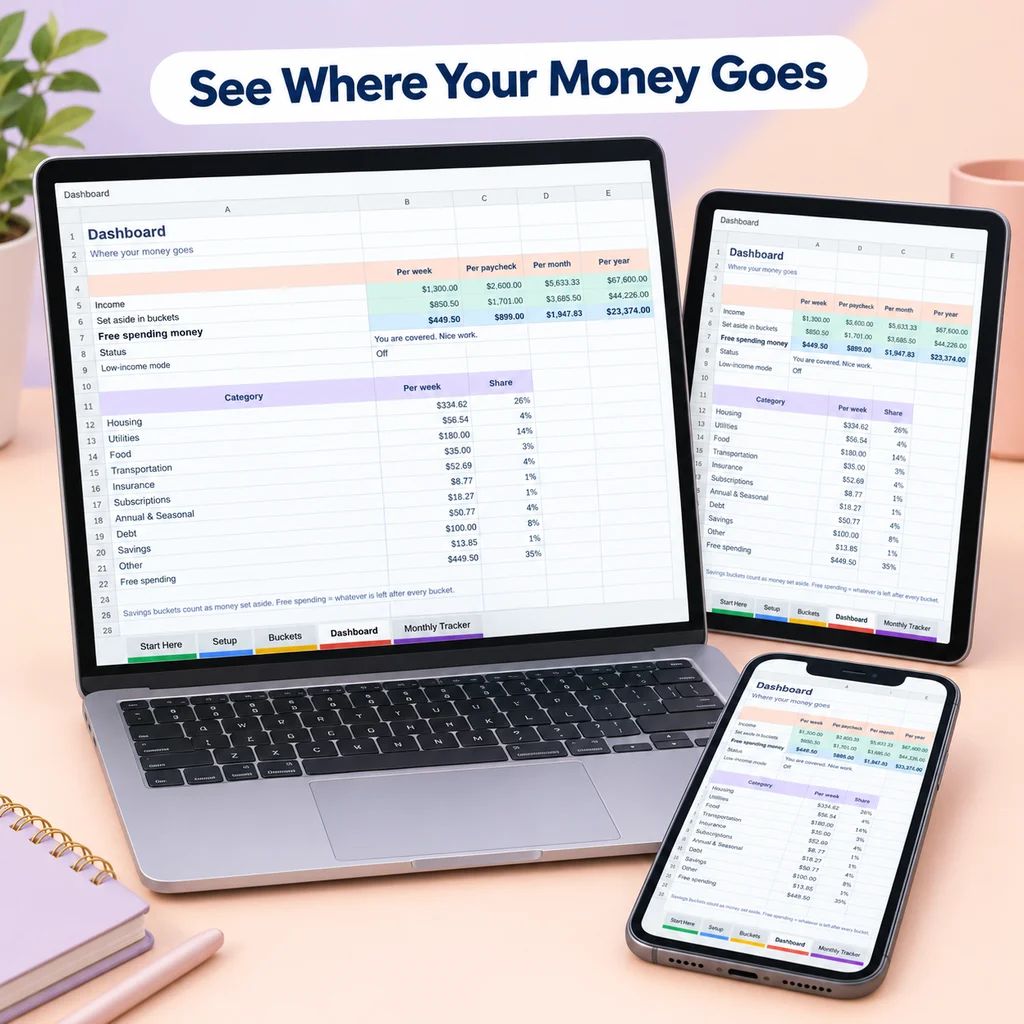
A zero-based budget assigns every unit of income to a purpose until nothing is left unassigned. A bucket budget sorts your money into named buckets with an amount per period. They overlap a great deal, and the difference is mostly about where you stop and what you call the leftover.
This page explains both without recommending one. The best method is the one you will keep using.
What is a zero-based budget?
In a zero-based budget, income minus all planned outflows equals zero. "Outflows" includes bills, spending, savings and debt payments. If you earn 2,000 for a pay period and plan bills of 1,200, spending of 500, savings of 200 and a debt payment of 100, you have assigned 2,000, and the remainder is zero.
Three points are often misunderstood:
- Zero does not mean you spend everything. Money going to savings is assigned, so it counts.
- It is done before the period starts. You write the plan first, then live it.
- Every pay period gets its own plan. Costs, income and goals change.
The method is popular because it leaves no money unaccounted for. If something is unassigned, you notice.
What is a bucket budget?
In a bucket budget, you create buckets for every bill, goal and spending area, each with an amount and a frequency (weekly, biweekly, monthly, yearly and so on). The amounts are converted to a common unit, such as per week or per paycheck, so you can add them up and compare with income. The result is what is left over after every bucket is funded.
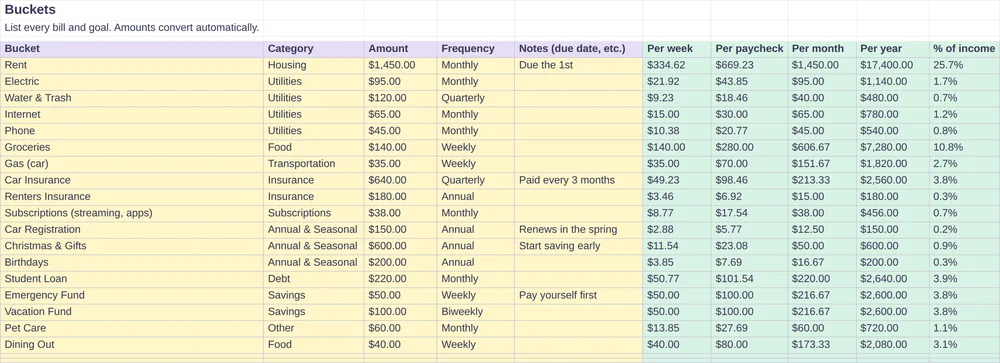
The distinguishing feature is time conversion: a yearly bill becomes a small weekly amount. That makes irregular costs part of the regular plan. You can read more in what is bucket budgeting.
Side by side
| Zero-based budget | Bucket budget | |
|---|---|---|
| Core idea | Every unit of income gets a job | Every bill and goal becomes a bucket with a small regular amount |
| Main question | Where does each unit go? | How much do I set aside from each paycheck for each bucket? |
| Typical rhythm | Per month or per paycheck | Per week or per paycheck |
| Irregular costs | Added as a line in the month they happen, or via a savings category | Built in by converting yearly costs to a regular amount |
| Leftover | Assigned until zero | Shown as what is left to spend |
| Tracking | Compare planned and actual | Compare planned and actual |
| Template shape | Income minus a list of categories equals zero | A list of buckets with frequency, plus a total |
Where they overlap
- Both begin with income and a list of what you pay for.
- Both ask you to include savings and debt payments as planned items, not as leftovers.
- Both work better when you check them against real spending.
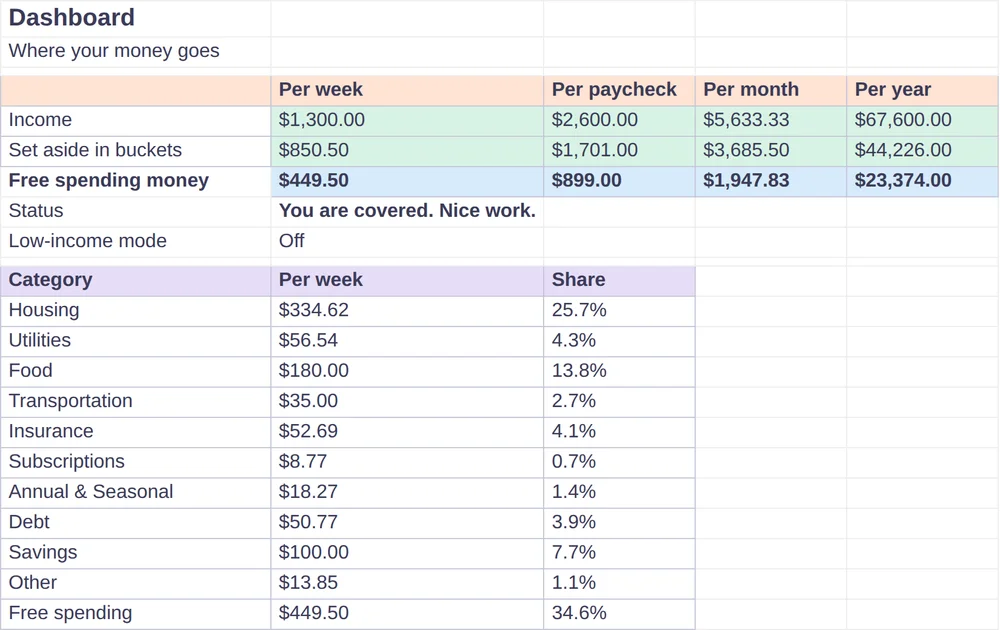
- A bucket budget becomes zero-based when you assign everything that is left to a bucket, such as savings, debt or spending money.
Envelope budgeting, which gives each category a limited pot of cash, is a third relative. See envelope budgeting for how it compares.
Which might fit you?
Some questions that may help:
- Do you want every unit to have a job on paper? A zero-based approach is built for this.
- Are yearly and quarterly bills your main problem? The time conversion in a bucket budget is designed for them.
- Are you paid weekly or biweekly? A per-paycheck approach may feel more natural than monthly categories.
- Do you like to adjust during the month? Both allow it. Buckets with a weekly amount make mid-month changes easy to see.
- How many decisions can you handle? A shorter list of buckets takes fewer decisions than a full zero-based plan.
You can also start with buckets and then assign the leftover until it is zero. Nothing prevents combining them.
A zero-based template, step by step
If you want to build one yourself in a spreadsheet:
- Enter your income for the period.
- List categories in rows: fixed bills, variable spending, savings, debt.
- Enter an amount for each.
- Add up all categories.
- Subtract the total from income. If the result is not zero, adjust until it is.
- Add a column for actual spending and compare at the end of the period.
How Bucket Budget Planner fits
Bucket Budget Planner is a bucket budget. It does not claim to be a zero-based template. What it does is calculate "what is left to spend" after every bucket is funded: income is entered on the Setup tab, the Buckets tab converts each bucket to weekly, per-paycheck, monthly and yearly amounts, and the Dashboard shows the remainder. If you want a zero-based result, you can assign that remainder to a bucket (more savings, extra debt payments or spending money) until it reads zero.
The planner is an Excel file that imports into Google Sheets, and a Quick Start Guide explains how. Monthly tabs let you record actual spending to compare with the plan, which is useful whichever method you choose.
Common mistakes with either method
- Skipping yearly costs. They will arrive anyway.
- Planning exact amounts for variable categories. Use an average and a buffer.
- Never checking. A plan without review turns into a guess.
- Making it too complicated. The simplest version you will use is better than a perfect one you abandon.
For the step-by-step method that works with either approach, see how to budget a paycheck. To track what you actually spend, see the monthly spending tracker guide.
This guide is general information, not financial advice.